Overview
idmtools_calibra is an iterative calibration framework for scientific and epidemic models. It runs parameter sweeps, compares model output to reference data, and updates the sampling strategy until convergence.
Calibration workflow
The calibration loop is orchestrated by CalibManager and follows these steps each iteration:
- Sample —
NextPointAlgorithm.get_samples_for_iteration()generates a set of parameter combinations to evaluate. - Configure —
map_sample_to_model_input_fnmaps each sample row to the simulation task. - Execute — Simulations are submitted and run via the idmtools
Platform(Container / COMPS / Slurm). - Analyze —
BaseCalibrationAnalyzercompares model output to reference data and returns a likelihood or error score. - Update —
NextPointAlgorithm.set_results_for_iteration()updates the algorithm state with the scores. - Plot —
BasePlotter.visualize()generates diagnostic plots for the iteration.
Each iteration's state is written to Calibration.json, enabling resume from any iteration or phase.
How OptimTool works: EMOD SIR example
The following walks through a concrete calibration of an EMOD SIR model (examples/emod_sir/OutputOption1) to illustrate how OptimTool narrows in on the right parameters.
The problem
Three dynamic parameters control disease dynamics:
| Parameter | EMOD Name | Guess | Min | Max |
|---|---|---|---|---|
a |
Base_Infectivity_Constant |
5 | 0 | 10 |
b |
Infectious_Period_Exponential |
5 | 0.1 | 10 |
c |
Incubation_Period_Constant |
5 | 0 | 20 |
The reference data is a single scalar — the timestep of peak prevalence:
1 2 | |
The goal is to find values of a, b, c such that the simulated epidemic peaks at t ≈ 60.
Step 1: Samples become simulations
Each iteration, OptimTool generates ~25 parameter combinations. Each row runs one EMOD simulation:
| Sample | Base_Infectivity | Infectious_Period | Incubation_Period |
|---|---|---|---|
| 0 | 0.30 | 5.0 | 3.0 |
| 1 | 0.35 | 4.8 | 2.7 |
| 2 | 0.28 | 5.2 | 3.1 |
| ... | ... | ... | ... |
Step 2: Each simulation gets a score
The analyzer compares the simulated infected curve to the reference data, producing a single fitness score per sample. The closer the simulation matches the reference, the higher the score.
Step 3: OLS regression fits scores to parameters
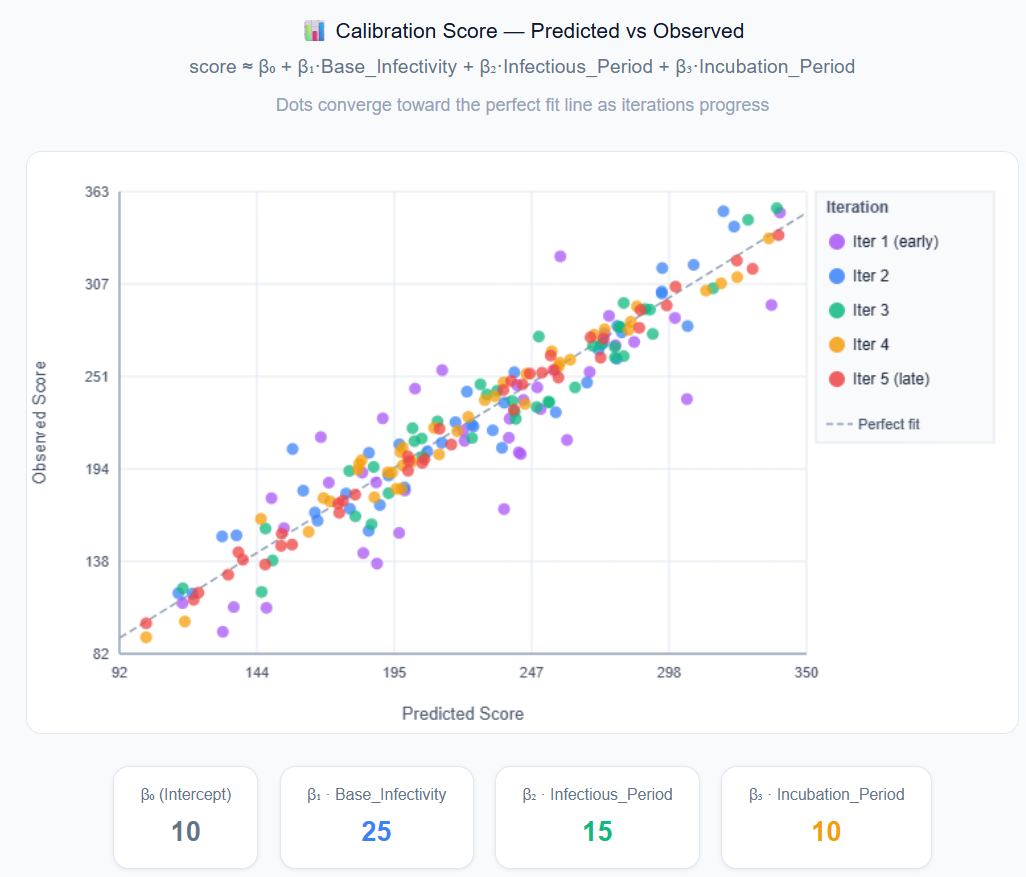
OptimTool fits an OLS (Ordinary Least Squares) regression to the current iteration's samples and scores:
1 | |
With 25 samples and 4 unknowns, this is an overdetermined system. In matrix form:
1 2 3 4 5 6 7 8 9 10 | |
Step 4: Gradient tells you which way to move
Say the fitted coefficients are:
β₁ = +50→ increasing infectivity improves fitβ₂ = −20→ decreasing infectious period improves fitβ₃ = +5→ slightly longer incubation helps
The algorithm shifts the center point in that direction and draws new samples around it.
Step 5: Repeat until convergence
1 2 3 4 5 6 7 8 9 10 11 12 13 | |
What we are solving for
The calibration goal is to find the disease model parameters (a, b, c) — the values
passed into EMOD that reproduce the observed epidemic. These are the final output of the calibration.
The β₀, β₁, β₂, β₃ above are OptimTool's internal OLS regression coefficients. They approximate the fitness landscape for the current iteration to estimate which direction to move the search center. They are a navigation tool, not the end result, and are discarded after each iteration.
| What they are | Role | |
|---|---|---|
a, b, c |
EMOD model parameters | Output — what calibration is trying to find |
| β₀, β₁, β₂, β₃ | OLS regression coefficients | Internal — gradient direction estimate, discarded each iteration |
When R² is low
If the score–parameter relationship is highly nonlinear in the sampled region (common in SIR models, where small changes in infectivity can cause dramatic shifts in epidemic dynamics), the linear fit will be poor. In that case the algorithm jumps directly to the best-scoring sample rather than trusting the gradient direction. This makes OptimTool robust to nonlinear fitness landscapes.
Algorithm selection
| Algorithm | Class | Strategy | Best for |
|---|---|---|---|
OptimTool |
OptimTool |
Adaptive OLS regression | General-purpose; start here |
IMIS |
IMIS |
Bayesian importance sampling | When you need the full posterior distribution, not just the best point |
GPC |
GPC |
Gaussian process surrogate | Smooth, low-dimensional parameter spaces |
SPSA |
SPSA |
Stochastic gradient approximation | Noisy objective functions |
PSPO |
PSPO |
Particle swarm / perturbation | Population-based optimization |
PBNB |
OptimToolPBNB |
Progressive branch-and-bound | High-dimensional bounded spaces |
OptimTool key tuning parameters:
| Parameter | Default | Description |
|---|---|---|
mu_r |
0.1 |
Mean fractional step size — how far to move each iteration |
sigma_r |
0.02 |
Step size standard deviation |
rsquared_thresh |
0.5 |
R² threshold; below this, fall back to best sample |
samples_per_iteration |
100 |
Simulations per iteration |
See API Reference: Algorithms for full details on all algorithms.
Multi-site calibration
Pass multiple sites to CalibManager to calibrate against several reference datasets simultaneously:
1 2 3 4 5 6 7 8 9 10 11 12 13 14 15 16 | |
Each site contributes an independent score per simulation. The framework combines them (weighted by analyzer.weight) into a single total score used by the sampling algorithm.
Key abstractions
| Class | Module | Role |
|---|---|---|
CalibManager |
calib_manager |
Top-level orchestrator |
NextPointAlgorithm |
algorithms/next_point_algorithm |
Abstract base for sampling strategies |
OptimTool |
algorithms/optim_tool |
Adaptive OLS regression-based algorithm (default) |
CalibSite / RMSESiteSingleChannel |
calib_site, rmse_site |
Wraps reference data and analyzers |
BaseCalibrationAnalyzer |
analyzers/base_calibration_analyzer |
Compares output to reference data |
IterationState |
iteration_state |
Serializable per-iteration state |
BasePlotter |
plotters/base_plotter |
Generates diagnostic plots |
BaseResampler |
resamplers/base_resampler |
Post-calibration resampling strategies |
ResumeManager |
utilities/resume_manager |
Supports resuming from any iteration and phase |
Resume support
CalibManager.run_calibration() supports resuming from any iteration and phase:
1 2 3 4 5 6 7 8 9 | |
iter_step options
| Value | Behaviour |
|---|---|
commission |
Start a new iteration with fresh parameter samples |
analyze |
Analyze existing simulation output from the given iteration |
plot |
Generate plots for the given iteration only |
next_point |
Advance directly to computing next iteration's samples |
Example: EMOD SIR (OutputOption1)
The examples/emod_sir/OutputOption1 example runs 6 iterations with 25 samples each against an EMOD-generic SIR model. The goal is to rediscover the true parameter values — Base_Infectivity_Constant = 0.2 (β), Infectious_Period_Exponential = 0.1 (γ), and Incubation_Period_Constant — that produce an epidemic peaking at t ≈ 60, starting only from broad initial guesses of 5 for all three.
1 2 3 4 5 6 7 8 9 10 11 | |
Run it:
1 | |
test_and_plot.py sweeps over 10 Run_Number seeds using the best-found parameter values and plots the resulting infected curves against the reference.
See examples/solar/ for the simplest starting point (2-parameter linear model), and examples/emod_sir/OutputOption1/README.md for the full EMOD SIR walkthrough.